Production Resource Tools: Boost Efficiency & Cut Costs
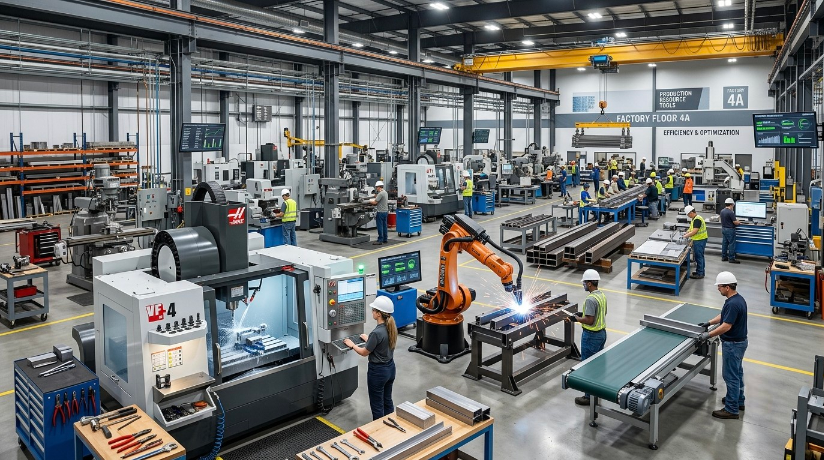
Running a production line, a creative studio, or a manufacturing floor without the right systems in place is a bit like driving cross-country without a map. You might get there eventually, but you’ll waste fuel, time, and probably your patience along the way. That’s exactly where production resource tools come into the picture. These platforms and systems help teams plan, allocate, and track every resource that keeps operations moving, from raw materials and equipment to staff hours and budgets. Whether you’re managing a small workshop or a sprawling industrial facility, understanding how production resource tools work can be the difference between chaotic scrambling and smooth, predictable output.
In this guide, we’ll walk through what these tools actually do, why they matter so much right now, and how to pick the right one for your team. We’ll also look at real-world scenarios, common pitfalls, and a few practical tips you can apply today. So grab a coffee, and let’s dig in.
What Are Production Resource Tools, Exactly?
At their core, production resource tools are software or systems designed to help businesses plan and manage the assets required to produce goods or services. Think of them as the command center for everything that goes into making a product: labor, machinery, inventory, time, and money. Instead of juggling spreadsheets or relying on someone’s memory, these tools centralize all that information in one place.
Most modern platforms combine several functions under one roof. You’ll often find scheduling modules, inventory trackers, budget forecasting features, and reporting dashboards bundled together. This integration matters because production rarely happens in isolated silos. A delay in raw material delivery affects the schedule, which then affects labor costs, which eventually trickles down to your bottom line. Good production resource tools connect these dots automatically, so you’re not left guessing why a project suddenly went over budget.
It’s also worth noting that these tools aren’t just for massive corporations with deep pockets. Small businesses and freelancers increasingly rely on lighter versions of these systems too. A boutique furniture maker, for instance, might use a simplified resource tracker to manage wood inventory and craftsman hours, while a Fortune 500 manufacturer uses an enterprise-grade suite with AI-driven forecasting. The scale differs, but the underlying goal stays the same: use resources wisely and avoid waste.
Why the Terminology Can Get Confusing
You’ll notice that different industries call these systems by different names. Film and media production teams might refer to them as “production management software,” while factories often say “resource planning systems” or simply “ERP tools.” Despite the varied vocabulary, they all fall under the broader umbrella of production resource tools because they share the same mission: optimizing how resources are used across a project lifecycle.
This naming overlap can trip up newcomers who are researching solutions online. Someone searching for options in construction might miss a perfectly good tool because it’s marketed under manufacturing terminology instead. That’s why it helps to think functionally rather than by label. Ask yourself what problem you’re solving, whether it’s scheduling, budgeting, or inventory control, and search from that angle rather than chasing a specific buzzword.
Why Production Resource Tools Matter More Than Ever
A few years ago, many teams got by using Excel sheets and shared drives. Honestly, some still do. But as supply chains have grown more complex and customer expectations have climbed, that old-school approach has started showing its cracks. Delays that once seemed minor now ripple into major client dissatisfaction within days, not weeks.
Consider a mid-sized apparel manufacturer that recently struggled with fabric shortages during a seasonal rush. Their team was tracking inventory manually across three different spreadsheets maintained by different departments. Nobody noticed the shortfall until it was too late, and they missed a major retail deadline. After switching to a centralized production resource tool, they gained real-time visibility into stock levels across all locations. The next season, they caught a similar shortage three weeks in advance and adjusted their supplier orders without missing a beat.
That’s the kind of story that plays out again and again across industries. Companies that adopt these systems tend to catch problems earlier, communicate better across departments, and make faster decisions backed by actual data rather than gut instinct. In a competitive market, that speed and accuracy can be the deciding factor between winning a client and losing one to a faster-moving competitor.
The Cost of Ignoring Proper Resource Management
Skipping structured resource management doesn’t just create minor headaches; it can quietly drain profits over time. Idle machinery, overstocked materials, and underutilized staff hours all cost money even when nothing seems visibly wrong. Many businesses don’t realize how much they’re losing until they finally implement tracking tools and see the numbers laid out plainly.
There’s also a human cost to poor resource planning. Teams working without clear visibility often experience burnout from last-minute scrambling and unclear priorities. Nobody enjoys finding out at 4 PM that a critical part didn’t arrive and the whole afternoon’s schedule needs reshuffling. Reliable production resource tools reduce this kind of chaos by giving everyone, from floor managers to executives, a shared source of truth they can check anytime.
Core Features to Look For
Not every tool on the market offers the same depth of functionality, so it helps to know what separates a genuinely useful platform from one that just looks good in a sales demo. Below are the features that tend to matter most, regardless of your industry.
Real-Time Inventory and Asset Tracking
This is arguably the backbone of any solid system. You want to know, at any given moment, exactly how much material you have, where your equipment is located, and whether anything is running low. Tools with barcode scanning, RFID integration, or IoT sensors take this a step further by updating records automatically instead of relying on manual entry, which is notoriously prone to human error.
Real-time tracking also helps with forecasting. If your tool can show usage trends over the past six months, you can predict future needs more accurately instead of reactively ordering supplies at the last minute. That predictive edge alone can justify the cost of a premium platform for many mid-sized operations.
Scheduling and Capacity Planning
A good production resource tool doesn’t just tell you what you have; it helps you figure out how to use it efficiently over time. Scheduling modules let managers assign tasks, equipment, and personnel to specific time slots while flagging conflicts before they happen. This prevents situations where two projects accidentally compete for the same machine or the same skilled technician.
Capacity planning features go a bit deeper by analyzing whether your current resources can actually meet upcoming demand. Imagine a print shop that just landed a huge order for a wedding season rush. Without capacity planning, they might overcommit and disappoint clients with late deliveries. With it, they can see exactly how many hours their presses can realistically handle and adjust timelines or staffing before making promises they can’t keep.
Budget Forecasting and Cost Control
Money ties everything together, so any serious production resource tool needs strong financial tracking baked in. This usually includes budget forecasting, cost-per-unit calculations, and variance reports that highlight when actual spending diverges from projections. Catching these variances early gives teams a chance to course-correct before a small overspend becomes a massive one.
Some platforms also integrate with accounting software, which eliminates the tedious task of manually reconciling numbers between systems. This kind of integration saves hours every month and reduces the risk of costly data entry mistakes slipping through unnoticed.
Reporting and Analytics Dashboards
Data is only useful if people can actually understand it quickly. That’s why dashboards matter so much. The best production resource tools translate raw numbers into visual reports, charts, and summaries that non-technical staff can interpret at a glance. A well-designed dashboard might show machine downtime trends, labor efficiency scores, or material waste percentages, all updated automatically.
These insights aren’t just for management review meetings either. Frontline supervisors often use daily dashboard snapshots to make immediate decisions, like reallocating workers to a bottlenecked station before the whole shift falls behind schedule.
Choosing the Right Tool for Your Business
With dozens of platforms competing for attention, choosing the right production resource tool can feel overwhelming. It helps to start by mapping your actual pain points rather than getting seduced by flashy feature lists. If your biggest issue is inventory chaos, prioritize tools with strong tracking capabilities over ones that focus heavily on scheduling, and vice versa.
Budget matters too, obviously, but it shouldn’t be the only deciding factor. A cheaper tool that lacks scalability might force you into a painful migration a year or two down the line once your business grows. On the flip side, overpaying for enterprise features you’ll never use is just as wasteful as the inefficiencies you’re trying to fix in the first place.
Matching Tools to Team Size and Industry
Smaller teams generally benefit from lightweight, intuitive platforms that don’t require weeks of onboarding. A five-person bakery doesn’t need the same complexity as a 500-employee automotive plant, and forcing that complexity onto a small team often backfires, leading to underused features and frustrated staff. Simplicity, in many cases, beats sophistication.
Larger organizations, meanwhile, often need tools that can integrate with existing enterprise systems like ERP or CRM software. Compatibility becomes a critical filter here, since a resource tool that can’t talk to your other software creates more silos rather than solving them. It’s worth asking vendors directly about their integration capabilities before signing any contract.
Testing Before Committing
Almost every reputable vendor offers a free trial or demo period, and skipping this step is a mistake many businesses make when they’re in a rush to solve problems. Testing a tool with your actual data, even for just two weeks, reveals usability issues that no sales pitch will ever mention. Maybe the interface looks clean in a demo but becomes clunky once you input hundreds of real inventory items.
Involve the people who’ll actually use the system daily during this testing phase, not just executives or IT staff. Floor managers and schedulers often spot friction points that decision-makers miss entirely, since they’re the ones who’ll be clicking through the interface dozens of times a day.
Common Mistakes When Implementing Production Resource Tools
Even great tools can fail if the rollout is handled poorly. One frequent mistake is trying to migrate everything at once instead of phasing the implementation. Switching an entire operation’s tracking system overnight, without a transition period, almost guarantees confusion and data gaps. A phased approach, starting with one department or product line, lets teams adjust gradually while working out kinks before scaling company-wide.
Another common misstep is neglecting proper training. Even the most intuitive platform requires some learning curve, and skipping formal training sessions in favor of “figuring it out as you go” usually leads to inconsistent data entry. When different employees input information differently, the whole point of centralized tracking falls apart, since the numbers become unreliable.
Lastly, businesses sometimes forget to revisit their setup after the initial launch. Production resource tools aren’t a one-time install-and-forget solution. As your business evolves, so should your configurations, workflows, and reporting structures. Scheduling a quarterly review of how the tool is being used can catch outdated processes before they cause real problems.
Real-World Impact: A Quick Case Study
A regional bakery chain with six locations once relied entirely on phone calls and text messages to coordinate ingredient deliveries between its central kitchen and satellite shops. Predictably, this led to frequent shortages of popular items like croissant dough during weekend rushes. After adopting a cloud-based production resource tool, they gained a shared dashboard showing real-time stock across every location.
Within three months, stockouts dropped by nearly 40 percent, and delivery drivers spent less time making emergency runs between shops. The bakery’s operations manager later noted that the tool essentially replaced dozens of daily phone calls with a single glance at a screen each morning. It wasn’t a flashy transformation, but it saved real money and reduced daily stress for the entire team.
This kind of story repeats across countless industries, proving that the value of production resource tools isn’t theoretical. It shows up in fewer missed deadlines, calmer teams, and healthier profit margins, often within just a few months of proper implementation.
Conclusion: Bringing It All Together
Production resource tools have quietly become essential infrastructure for businesses of nearly every size and industry. They replace guesswork with visibility, turning scattered spreadsheets and hallway conversations into centralized, reliable systems everyone can trust. From real-time inventory tracking to smart scheduling and budget forecasting, these platforms address the everyday friction points that quietly drain time and money.
The key takeaway here is that choosing the right tool isn’t about picking whatever’s most popular or expensive. It’s about honestly assessing your team’s actual pain points, testing solutions with real data, and rolling out changes gradually rather than all at once. Done thoughtfully, adopting the right production resource tools can transform how your entire operation runs, from the shop floor to the executive dashboard.
If you’re still relying on manual tracking methods, now’s a good time to explore what a dedicated system could do for your workflow. Start small, involve your team in the decision, and don’t be afraid to switch platforms if your first choice doesn’t fit. The right fit is out there, and the payoff, in saved time and reduced stress, is usually worth the effort of finding it.
Frequently Asked Questions
1. What industries benefit most from production resource tools?
Nearly every industry that produces physical goods or manages complex projects can benefit, including manufacturing, construction, film and media, food service, and retail. Even service-based businesses managing labor and equipment schedules find value in these systems.
2. Are production resource tools only for large companies?
Not at all. Many platforms offer scaled-down versions specifically built for small businesses and freelancers, with simpler interfaces and lower costs than enterprise-grade suites.
3. How long does it typically take to implement a new resource tool?
Implementation timelines vary widely, but most small to mid-sized businesses can expect a phased rollout lasting anywhere from a few weeks to a couple of months, depending on data migration complexity and staff training needs.
4. Can these tools integrate with existing accounting or ERP software?
Many modern platforms are built with integration in mind, connecting seamlessly with popular accounting, CRM, and ERP systems. It’s important to confirm compatibility with your existing software before making a purchase decision.
5. What’s the biggest mistake businesses make when adopting these tools?
Rushing the rollout without proper staff training or attempting a full-scale migration overnight tends to cause the most problems. A gradual, department-by-department approach almost always leads to smoother adoption.

Post Comment